The Complete Guide to AI Agents 2025 Edition

1️⃣ Why AI Agents Matter Now
If you’re running a business today, you’ve probably noticed the same pattern:
your inbox is full of AI tools, automation platforms, and chatbots promising miracles.
It’s noisy, and confusing.
But beneath the buzz, something real is happening.
A quiet revolution is reshaping how work gets done, not by replacing people, but by replacing repetition.
The Real Shift
For decades, businesses relied on software to store data and people to use it.
AI agents flip that relationship: they use software for you.
Think of them as digital team members who can understand goals, make decisions, and take action across systems, 24/7, without getting tired or losing context.
That means:
- No more endless copy-paste between tools.
- No more waiting for reports or follow-ups.
- No more routine “busy work” that drains skilled employees.
Why Now?
Until recently, only large corporations could afford automation.
But today:
- LLMs (like GPT-4/5) have made reasoning and text understanding cheap.
- APIs connect almost every business tool, CRMs, inboxes, spreadsheets.
- Low-code platforms let developers deploy agents in days, not months.
So while many businesses are still experimenting with “AI assistants,” others are already seeing real ROI from fully autonomous systems.
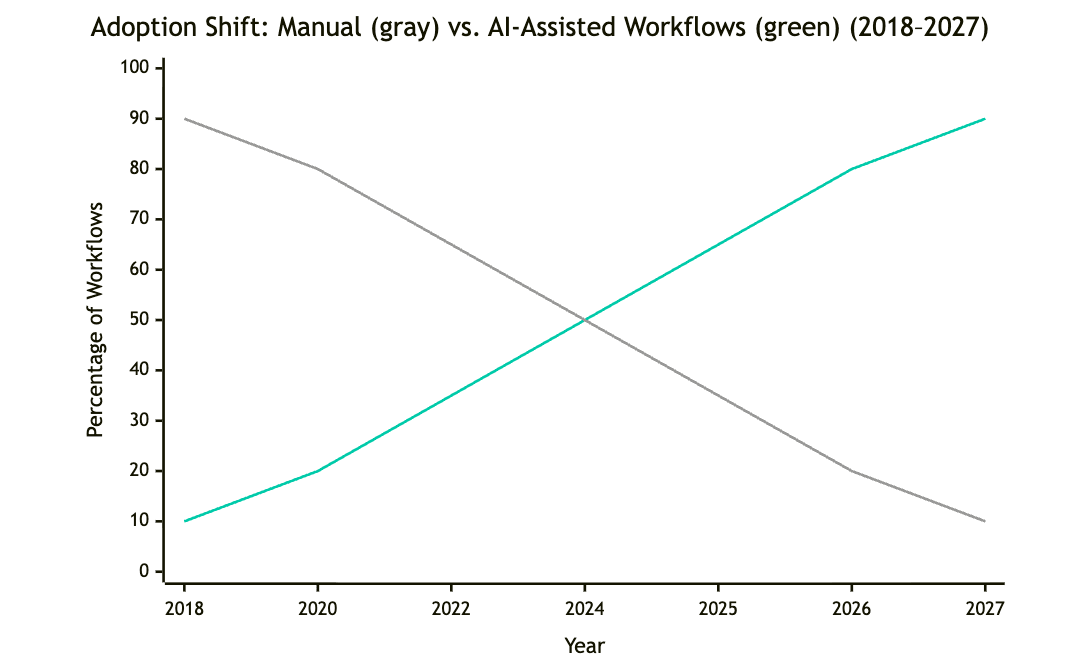
📊 According to Gartner, by 2027 over 60% of SMBs will use some form of AI-driven automation to handle core workflows.
The Bottom Line
AI agents are no longer futuristic.
They’re today’s competitive advantage, for any company that wants to scale operations without scaling headcount.
2️⃣ What AI Agents Really Are
Let’s strip away the hype.
An AI agent isn’t magic or a single product.
It’s simply software that understands your intent, decides what to do, and does it.
If ChatGPT is like an intern waiting for instructions,
an AI agent is like a junior employee who knows the goal and checks in when the task is done.
The Plain Definition
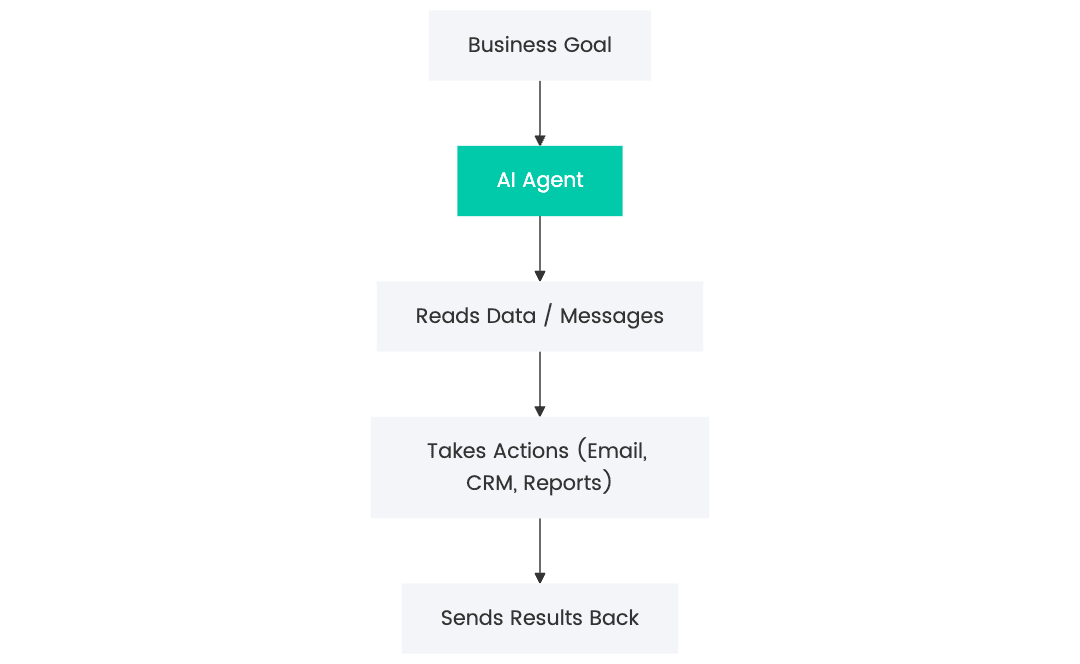
💬 An AI agent is a system that perceives its environment, reasons about what to do next, and acts toward a defined goal.
In business terms:
It’s a digital worker that can understand context (emails, tasks, CRM data), plan an action (send follow-up, update record, generate report), and execute it automatically.
The Business Analogy
Imagine you tell your assistant:
“Find 10 qualified leads from LinkedIn, email them with our latest offer, and notify me when someone replies.”
A human SDR might take hours.
An AI SDR agent can do that continuously, across thousands of prospects, with personalized messaging, follow-ups, and CRM syncs, while you focus on strategy.
Simple Visual
Why It’s Different from Normal Automation
Traditional automation follows fixed rules.
AI agents can reason and adapt.
They handle ambiguity:
- Understand human text (“Please follow up next week”).
- Learn from outcomes.
- Adjust actions dynamically.
In other words, they don’t just execute, they think and improve within limits you define.
🧩 3️⃣ How AI Agents Actually Work (Without Code)
Now that we know what they are, let’s peek inside the box, in plain English.
Every AI agent has three core ingredients:
🧠 1. Reasoning (the “Brain”)
This is where large language models (LLMs) come in.
They interpret tasks, generate text, make decisions, and plan actions.
They allow the agent to understand things like:
- “Send a polite follow-up to all unreplied emails.”
- “Summarize this 20-page report into bullet points.”
- “Find potential clients similar to Company X.”
🧱 2. Memory (the “Context”)
Memory allows agents to recall:
- What they did yesterday.
- What data they’ve processed.
- How a client responded last time.
Without memory, an AI is just a smart goldfish, it can reason, but forgets instantly.
With memory, it becomes a true digital coworker.
⚡ 3. Actions (the “Hands”)
Reasoning and memory are useless without the ability to act.
That’s where integrations come in.
An AI agent can:
- Send or reply to emails.
- Update CRM entries.
- Read files or scrape data.
- Generate documents or reports.
- Interact with APIs like Slack, LinkedIn, or HubSpot.
These actions turn intelligence into measurable productivity.
Putting It All Together
Here’s a simple mental model:
| Component | What It Does | Example |
|---|---|---|
| Brain | Understands goals | “Find leads who fit this ICP.” |
| Memory | Keeps context | “We already emailed them twice.” |
| Hands | Executes tasks | “Send follow-up and log reply.” |
The Feedback Loop
The true power of agents lies in the loop:

Every completed task gives feedback, success or failure, which the agent uses to refine its next action.
That’s what makes them autonomous rather than just automated.
💡 Quick Analogy
Think of your AI agent as:
- A junior employee (LLM)
- With a notebook (memory)
- And access to company tools (actions) All supervised by you, the manager setting goals and guardrails.
Why This Matters for Non-Technical Teams
You don’t need to understand the code, only the logic:
- Agents are built around clear business goals .
- They can plug into existing software.
- They improve incrementally.
Once that concept clicks, you can start spotting dozens of processes in your company that are agent-ready.
💬 Callout:
“AI agents don’t replace CRMs, inboxes, or staff, they connect and automate them.”
4️⃣ Real-World Use Cases by Department
Let’s see what these agents actually do inside a company.
Below are six departments where AI agents already create measurable ROI, and how they look in daily use.
Each of these agents works through a simple chat or dashboard interface, no code, no setup headaches.
You describe what you want (“Find new leads this week in Germany, similar to our past clients”), and the agent executes it behind the scenes.
🧩 Sales – The AI SDR Agent
Goal: Fill your calendar with qualified meetings, automatically.
How it works:
- You describe your ideal clients once (e.g., marketing agencies with 10–50 employees in the UK ).
- The AI SDR Agent: Finds matching companies and decision-makers.
- Verifies email addresses and LinkedIn profiles.
- Writes personalized outreach messages.
- Sends and schedules follow-ups.
- Syncs replies into your CRM or email inbox.
How it feels to use:
Like having a tireless assistant who finds and messages prospects 24/7, you just log in to approve templates and watch meetings appear in your calendar.
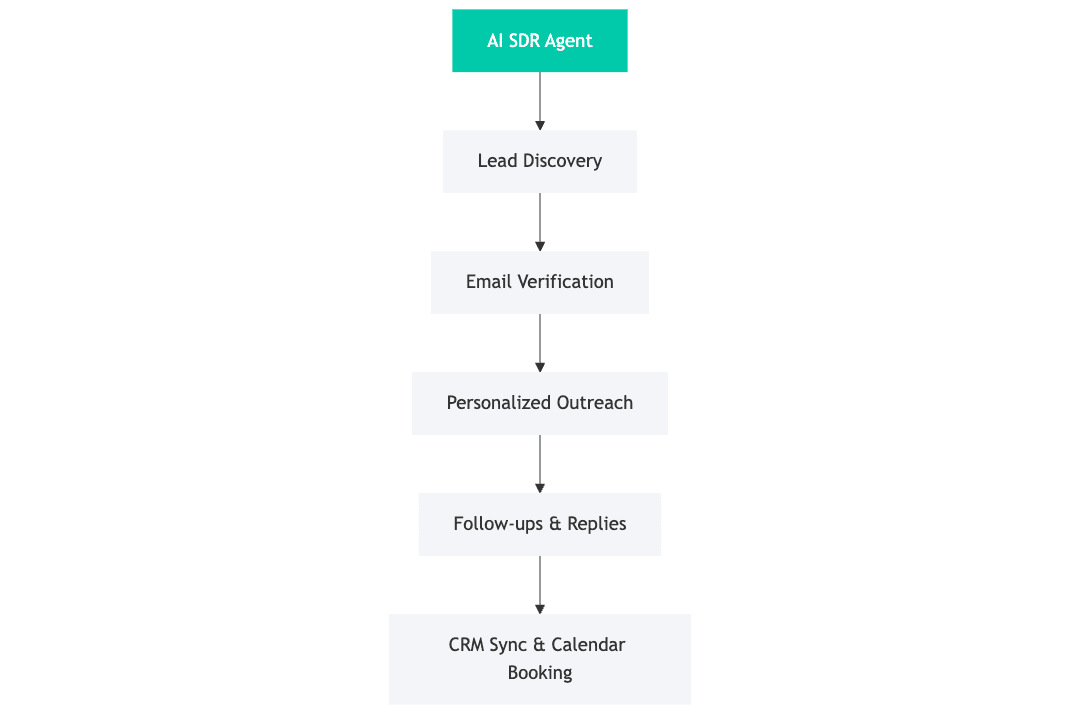
📈 Typical result: 3× more outreach volume with no extra hires.
👩💼 Recruiting – The AI Talent Scout
Goal: Automate pre-screening and candidate outreach.
How it works:
- HR uploads a short job description.
- The agent searches job boards, LinkedIn, and databases.
- It contacts top matches with a personalized message.
- Candidates reply; the agent pre-screens using structured questions (availability, experience, salary).
- Qualified profiles are pushed to your ATS or Slack.
How it feels to use:
You open a dashboard showing new candidates each morning, already filtered and summarized. You just click “Invite to Interview.”
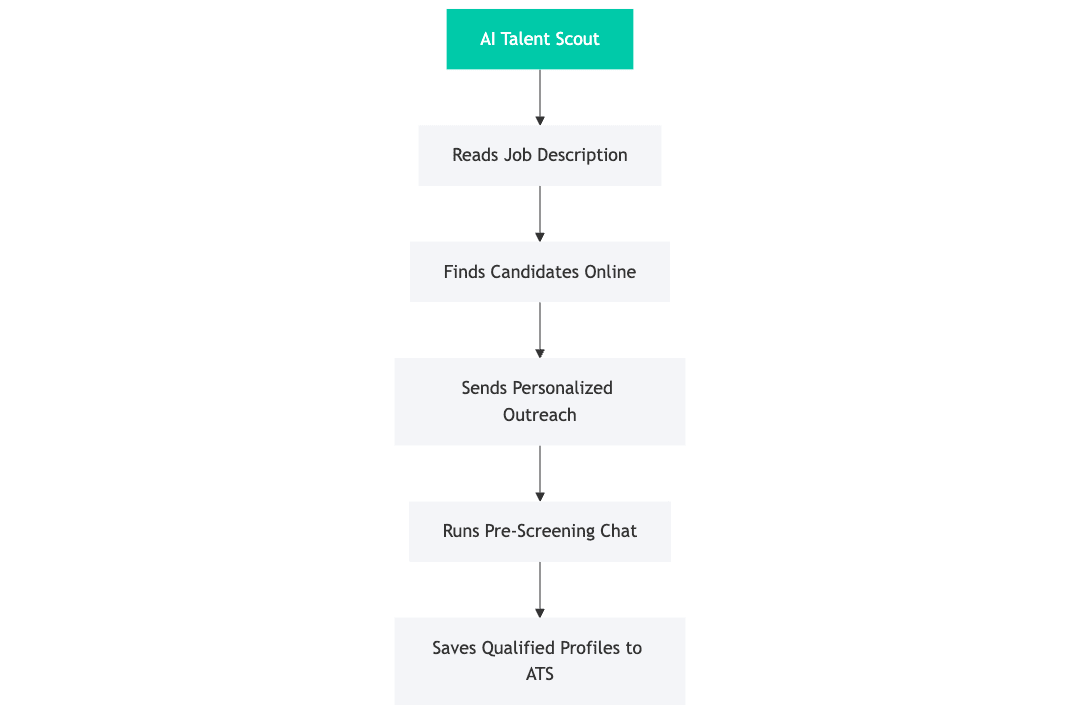
🕒 Time saved: 5–10 hours of manual sourcing per role.
🧮 Operations – The Daily Report Agent
Goal: Automatically compile and send operational summaries.
How it works:
- You tell the agent once what you want tracked (e.g., orders shipped, support tickets, payments).
- It connects to your systems (ERP, CRM, spreadsheets).
- Every morning it gathers the data, formats a summary, and emails or Slacks you the report.
How it feels to use:
No dashboards to check, your business summary arrives like a morning briefing from a personal assistant.
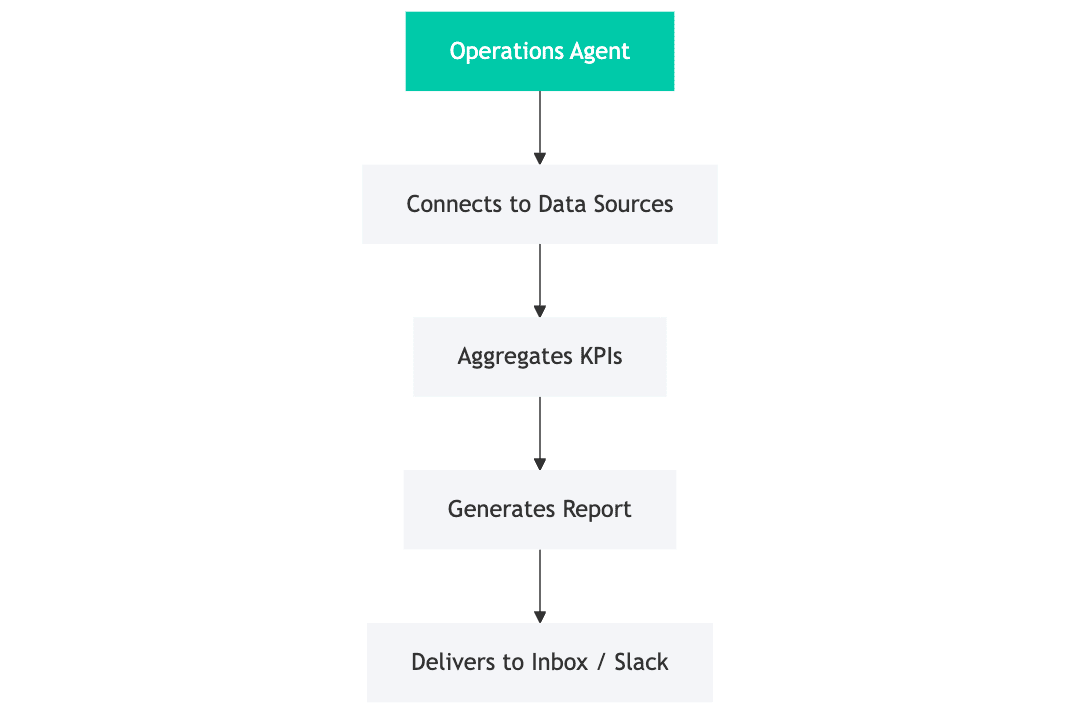
📊 Result: Instant visibility, zero spreadsheet time.
📢 Marketing – The Content Repurposer
Goal: Turn one piece of content into 20 variations across channels.
How it works:
- You drop a blog or video link.
- The agent extracts the key message and tone.
- It generates LinkedIn posts, tweets, newsletter blurbs, and even short scripts for video or audio.
- It schedules posts or exports them to your CMS.
How it feels to use:
You act as editor-in-chief: review, tweak tone, and approve. The rest is automated.
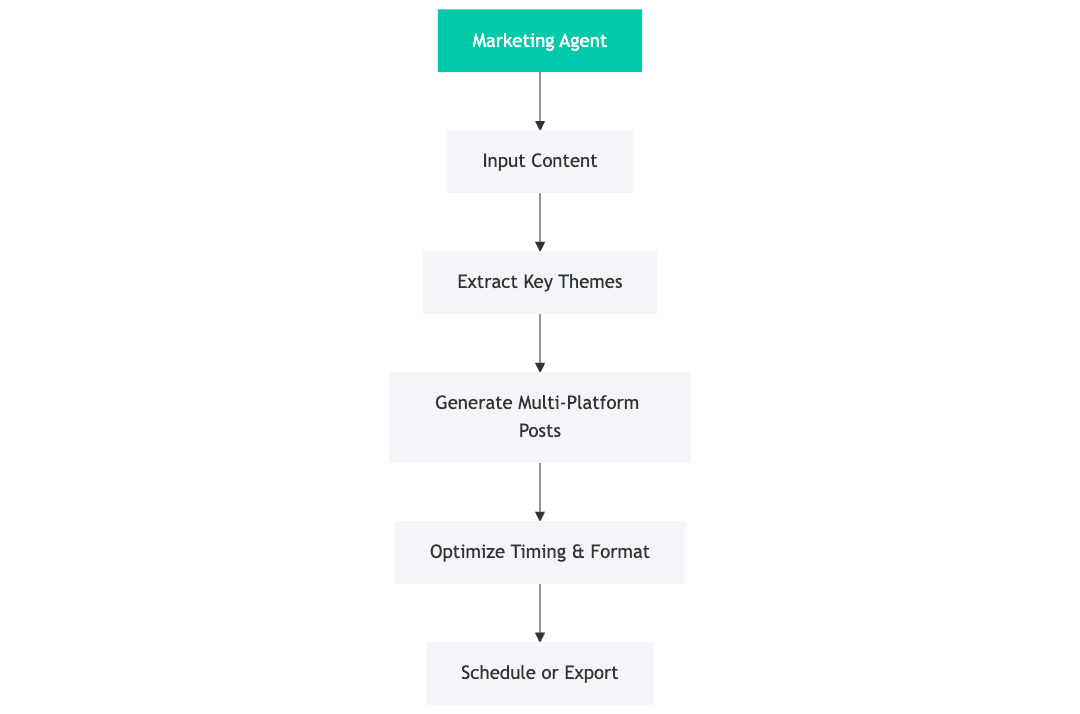
🚀 Impact: Up to 30× faster content production, consistent tone across all channels.
💬 Customer Support – The AI Helpdesk Agent
Goal: Resolve common questions instantly, keep humans for edge cases.
How it works:
- Connects to your existing FAQ, knowledge base, and past chat logs.
- Detects incoming tickets or messages (email, chat, WhatsApp).
- Replies in natural language, citing exact answers.
- Escalates only complex or emotional cases to humans.
How it feels to use:
You wake up to a near-zero ticket backlog. Support staff handle exceptions, not repetition.
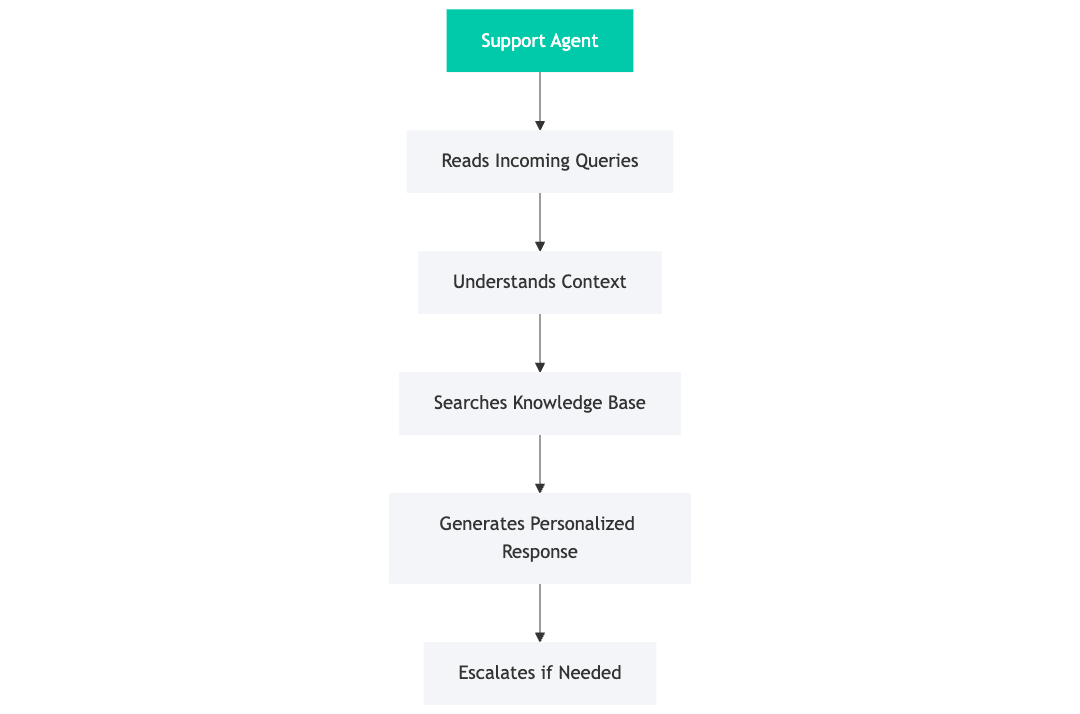
💡 Bonus: Always online, never impatient, always on-brand.
💰 Finance/Admin – The Invoice Reconciler
Goal: Eliminate manual matching of invoices and payments.
How it works:
- The agent connects to your accounting software and bank feed.
- It reads invoice PDFs or data, matches them to transactions.
- Flags mismatches or missing items.
- Sends daily summaries and updates records automatically.
How it feels to use:
No spreadsheets, no mismatched numbers, you just see “All reconciled ✅” each evening.
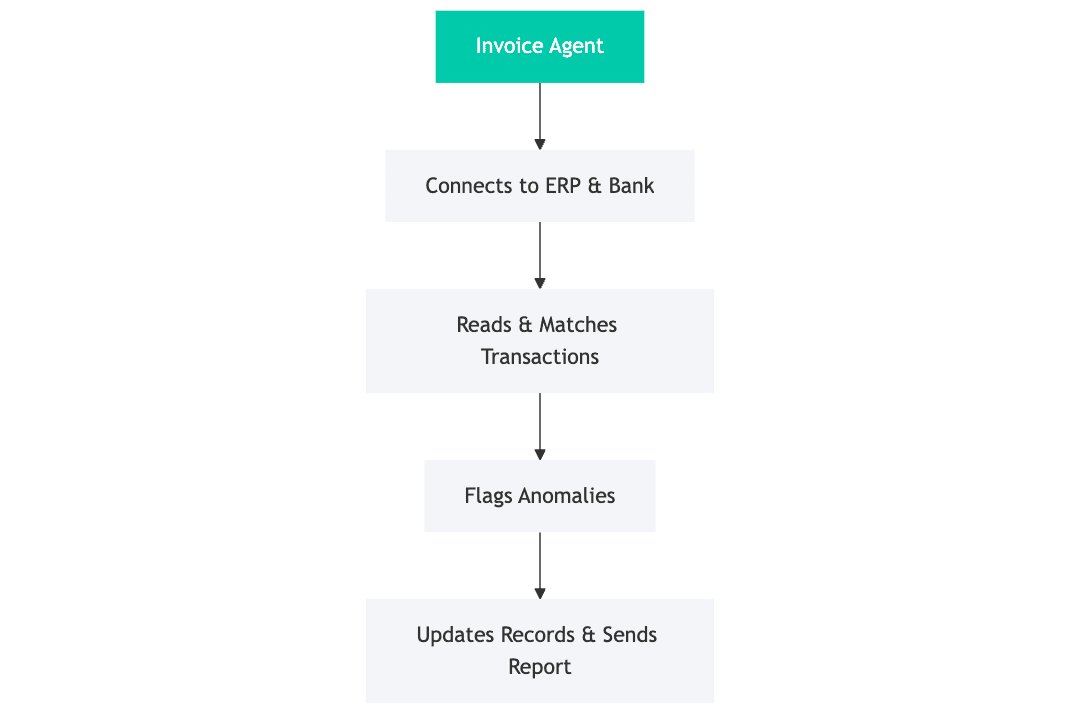
📉 Result: 90% less manual work, fewer accounting errors.
5️⃣ Inside an AI Agent: Components & Logic
When you strip away the marketing buzz, every AI agent, no matter whether it’s sending emails or reconciling invoices, follows a consistent internal logic.
You can think of it as a small digital company, where each part plays a specific role.

Let’s unpack these components in plain business language.
🧭 1. The Planner, The “Strategist” Brain
This is where the reasoning happens.
The planner uses a large language model (LLM), GPT-style, to interpret your intent and decide what steps to take.
Example:
You type into your dashboard:
“Reach out to 50 SaaS founders in Germany who recently raised funding.”
The planner breaks that goal into steps:
- Find SaaS companies in Germany with new funding.
- Identify founders or decision-makers.
- Create personalized outreach.
- Schedule follow-ups.
It doesn’t run the actions itself, it simply builds the plan.
⚙️ 2. The Executor, The “Operations Team”
Once the plan is ready, the executor takes over.
This layer uses connectors and APIs to interact with the real world, your CRM, Gmail, LinkedIn, or Notion board.
It:
- Runs searches and collects data.
- Sends or schedules messages.
- Updates spreadsheets or records.
- Uploads documents, fills forms, or triggers Zapier flows.
To a non-technical user, this looks like magic: you just see progress bars ticking along while tasks complete in the background.
You don’t need to code anything, you simply authorize connections once, then reuse them like plug-and-play tools.
✅ 3. The Checker, The “Quality Control Department”
Automation without oversight is risky.
That’s why every good agent has a checker, a layer that verifies results and ensures nothing goes off-script.
It checks:
- Did the message send correctly?
- Were all fields filled?
- Did any action fail or get blocked?
If something goes wrong, the checker pauses and asks you:
“Email verification failed for 2 leads, retry or skip?”
This keeps non-technical users in control while still enjoying automation speed.
🧠 4. The Memory, The “Company Knowledge Base”
Memory is what separates an AI agent from a simple script.
It lets the system remember what it did before.
Two layers of memory exist:
- Short-term (session memory): context of the current task, who’s being contacted, what has been said.
- Long-term (database memory): history of results, decisions, and patterns over time.
Example:
Your recruiting agent remembers that “Anna replied positively last week,” so it doesn’t follow up again.
Your SDR agent recalls the last tone or version that performed best, and reuses it automatically.
🔁 5. The Feedback & Learning Loop
The last piece closes the circle: every output is logged and analyzed for improvement.
This loop enables:
- Performance tracking, e.g. which outreach messages got the best replies.
- Continuous learning, e.g. adjusting language, timing, or filters automatically.
- Transparency, every action can be reviewed in a timeline log.
For business users, this means peace of mind: the agent evolves safely within visible boundaries.
🧩 Putting It All Together
The moment you click “Run Agent,” these layers activate simultaneously.
You see a live dashboard summarizing progress:
- ✅ Leads found: 57
- 📬 Emails sent: 55
- 🧠 Learning insights: “Personal tone increased response rate +22%.”
You don’t see code. You see results, exactly the way a manager sees a report from their team.
6️⃣ Building vs. Buying
Before investing, every company faces the same question:
Should we use a ready-made AI tool or build a custom agent?
Here’s how to decide, without technical jargon.
🧰 Pre-Built Tools (“Plug-and-Play”)
These are like renting a service: you sign up, connect your data, and start immediately.
Perfect for simple tasks such as:
- Generating social posts from blog links.
- Auto-replying to FAQs.
- Scheduling calendar reminders.
Pros
- Low cost (often subscription-based).
- No development time.
- Great for testing ideas.
Cons
- Limited flexibility.
- Isolated (can’t combine multiple workflows).
- Data usually stored on vendor’s servers.
If you outgrow it, you’ll hit limits fast, like trying to automate a sales pipeline with a chatbot built for FAQs.
🧠 Custom Agents (Invra Approach)
A custom agent is like hiring an employee who knows your business inside-out.
It plugs into your CRM, spreadsheets, databases, and APIs, using your company’s tone and rules.
Example scenario:
| Task | Pre-built Tool | Invra Custom Agent |
|---|---|---|
| Outreach emails | Sends templates | Writes unique, persona-based messages |
| Follow-ups | Fixed schedule | Adapts timing to replies |
| CRM sync | Manual export | Automatic 2-way updates |
| Analytics | Basic opens | Full campaign ROI dashboard |
Pros
- Seamless integration with your ecosystem.
- Works exactly the way your team does.
- Higher ROI over time.
Cons
- Requires short setup phase (1–3 weeks).
- Slightly higher upfront investment.
💡 Hybrid Model: Start with Ready Tools, Grow into Custom
Many SMEs start with basic automations (e.g., Zapier + ChatGPT) and evolve into custom agents once they see clear ROI.
Invra often begins projects by cloning those working automations, then upgrading them into a stable, compliant, and scalable architecture.
7️⃣ Implementation Roadmap
The secret to smooth AI adoption is a clear step-by-step process.
At Invra, we treat it like onboarding a new employee, structured, measurable, and transparent.
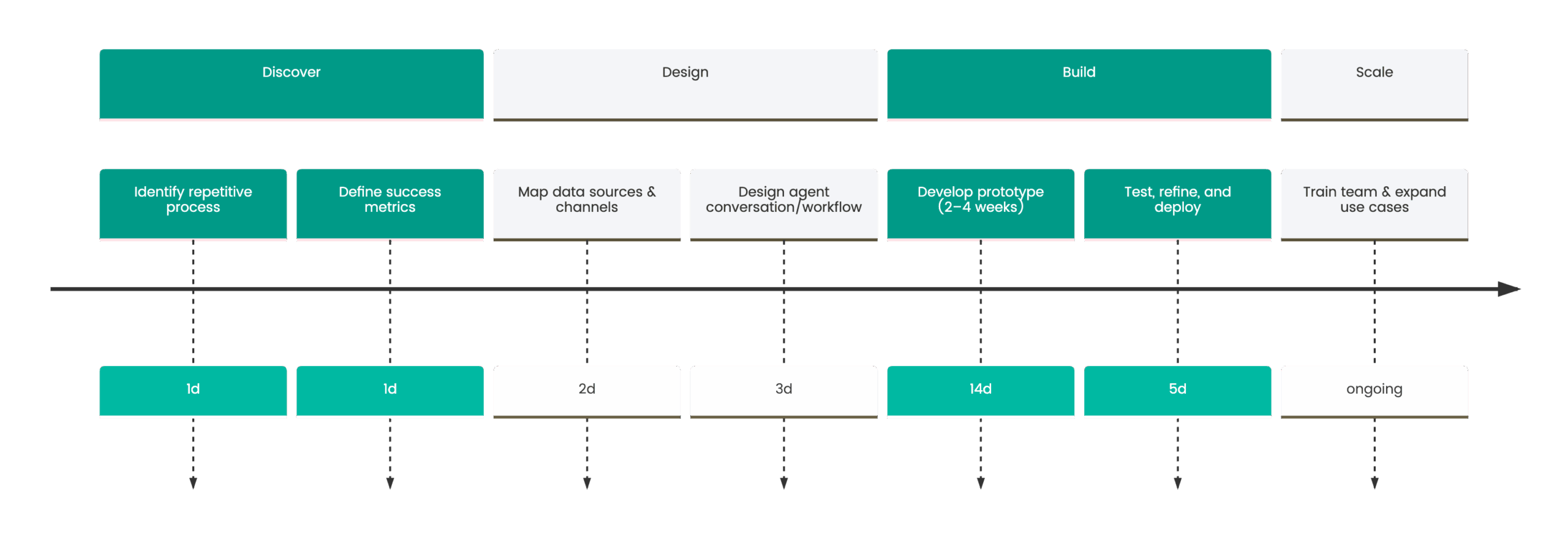
Step 1. Identify the Right Process
Start small. Choose one bottleneck that repeats daily.
Example: “Manually sending weekly performance reports.”
Step 2. Define Success Metrics
Quantify the benefit: “Reduce report prep time from 5 hours to 15 minutes.”
This clarity ensures measurable ROI later.
Step 3. Map Data & Channels
Non-technical users simply grant access (API keys or logins).
The agent connects securely and verifies everything works.
Step 4. Design the Workflow
Invra’s engineer or designer sketches your process visually.
You review steps like a flowchart, no code involved, until it feels right.
Step 5. Build Prototype
Within 2–4 weeks, a working version runs in test mode.
You can monitor live logs, approve templates, and simulate runs.
Step 6. Refine & Deploy
After user feedback, the agent goes live with logging and monitoring.
Optional Slack/Email alerts notify you when milestones or issues occur.
Step 7. Train Team & Scale
Once success is proven, new automations branch off from the same core.
Each department can request its own agent, HR, marketing, or finance.
8️⃣ Risks, Limits & Compliance
AI agents are powerful, but like any employee, they need guardrails.
Here’s how to ensure safety, legality, and reliability.
🧩 1. Data Privacy (GDPR & Beyond)
Agents handle sensitive data, client names, emails, finances.
Best practices:
- Use region-specific servers (EU data stays in EU).
- Encrypt at rest and in transit.
- Restrict access via OAuth (never store passwords).
- Provide “right to forget” compliance features.
🔍 2. Accuracy & Oversight
No model is perfect.
That’s why we use Human-in-the-Loop design, agents handle 95% of cases, humans review the rest.
Example:
The AI recruiter flags 5 best candidates → HR approves before scheduling interviews.
🧾 3. Transparency & Auditability
Every action should be traceable.
Invra agents keep a structured log:
- Timestamp
- Action type
- Result (success/failure)
- Reasoning snippet (why it acted this way)
This lets companies audit AI behavior at any time.
🧰 4. Ethics & Brand Consistency
Agents represent your brand voice.
We ensure:
- Polite, non-spammy outreach.
- Clear opt-outs and unsubscribe links.
- No bias or exclusion based on demographic data.
🧱 5. Reliability & Fail-Safe
When a system or API fails, the agent pauses automatically and alerts you, never looping endlessly or flooding clients.
📋 SME Compliance Checklist
| Area | Safe Practice |
|---|---|
| Data | Encrypted, region-bound storage |
| Oversight | Human review for key actions |
| Transparency | Detailed logs |
| Ethics | Brand-approved tone |
| Recovery | Auto-pause on error |
Invra integrates all of the above by default, so small teams can stay compliant without hiring data officers.
9️⃣ Measuring ROI
Without clear measurement, automation becomes guesswork.
Here’s how to calculate real business value.
📈 1. Quantify Time Savings
Track manual vs automated time.
Example formula:
ROI (time) = (Manual Hours – Automated Hours) × Hourly Cost × Period
If a process saved 20 hours/month at €30/hour → €600/month saved.
Multiply across departments, and it scales fast.
💰 2. Track Performance Uplift
For outbound agents, look at measurable outcomes:
- Meetings booked
- Responses generated
- Conversions achieved
Example:
| Metric | Before | After AI Agent | Δ |
|---|---|---|---|
| Leads messaged/week | 250 (per 1 SDR) | 750 | +200 % |
| Reply rate | 5 % | 18 % | +260 % |
| Booked calls | 10 | 30 | +500 % |
📉 3. Measure Error Reduction
Automation doesn’t get tired.
Compare human vs. agent accuracy in repetitive work:
- Data entry errors
- Report inconsistencies
- Missed deadlines
Even small improvements translate into major operational reliability.
🧠 4. Example ROI Snapshot
Case: AI Invoice Reconciler
- Manual: 4h/day × €25/h × 20 workdays = €2 000/month
- Agent cost: €350/month
- Net gain: €1 650/month per accountant → ROI 470 %
🧾 5. Beyond Numbers, Strategic ROI
Agents free up mental bandwidth.
When staff stop firefighting repetitive tasks, they can finally:
- Improve processes.
- Focus on clients.
- Innovate.
That’s the hardest ROI to quantify, and the most valuable.
🔟 Getting Started with Invra
AI agents shouldn’t feel like a tech project, they should feel like adding a new team member who happens to be digital.
Step 1. Quick Discovery Call
We identify one or two tasks that would have the highest ROI if automated.
Step 2. Feasibility & Mini Audit
Invra reviews your tools, data flow, and compliance needs.
You receive a short plan showing where an agent fits best.
Step 3. Prototype & Pilot
A working version runs within weeks, integrated with your CRM or email system.
You can monitor progress live via a simple dashboard.
Step 4. Scale
After proof of value, we expand the system to other departments.
💬 Invra helps SMEs and agencies turn repetitive work into intelligent workflows, building practical AI agents that book meetings, send reports, and manage daily tasks autonomously.
🗓️ Ready to see how this would look inside your company?