Never Update Your ATS Again: The Recruiter’s Background Automation

Your ATS isn’t the problem, it’s how much time you spend feeding it.
Most recruiters don’t hate their Applicant Tracking System.
They just hate how often they need to manually update it.
Every day, hours vanish into small admin rituals:
✅ Logging new candidates
✅ Changing statuses after every interview
✅ Copying notes from emails
✅ Updating “last contacted” fields
Individually, these actions take seconds, but multiplied across dozens of candidates and roles, they quietly consume entire workdays.
Automation changes that.
Modern AI and integration tools can now update your ATS automatically, in real time, based on what recruiters already do in their inbox, calendar, and chat.
The Hidden Cost of Manual Updates
When updates depend on memory, data becomes messy fast.
Recruiters often reply to candidates but forget to mark them as “contacted.”
Similarly, they schedule interviews yet fail to update the ATS afterward.
As weeks go by, strong candidates can easily slip through the cracks because no one adjusts their status.
Ultimately, this isn’t carelessness, it’s simply the cost of relying on manual effort.
Recruiters are hired to talk to people, not fight drop-down menus.
The result?
ATS data slowly becomes outdated, incomplete, and unreliable, turning one of your most powerful systems into a glorified spreadsheet.
How Background Automation Works
A background automation agent acts as a silent assistant, observing recruiter activity across tools and updating the ATS automatically.
Think of it as a personal sync layer between the recruiter’s daily workflow and the system of record.
Here’s how it fits together 👇
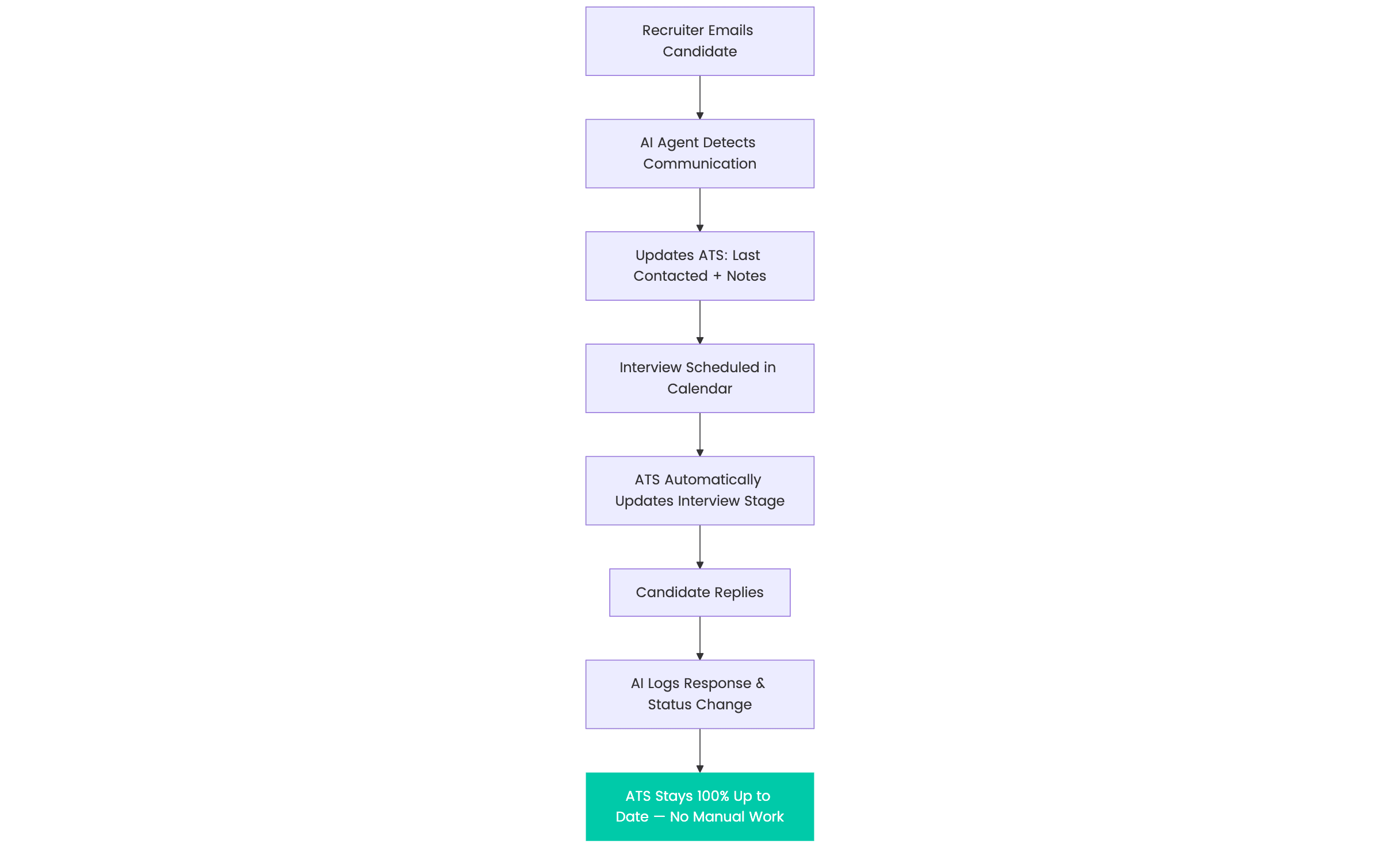
This background process happens silently, without any extra clicks from the recruiter.
The agent reads context from the recruiter’s activities (emails, calendar invites, interview notes) and updates the ATS fields accordingly.
From Manual Data Entry to Smart Synchronization
The automation covers every part of a recruiter’s day:
✉️ Emails are automatically logged, keeping “last contacted” dates up to date.
📅 When interviews are booked, the system links them directly to the candidate record.
🧠 Notes are captured from meeting titles or summaries.
And as soon as a candidate replies or completes a form, their status updates automatically.
Recruiters never have to touch a status dropdown again.
What It Means for Recruiters
Background automation doesn’t replace recruiters, it removes the friction from admin.
✅ Fewer clicks: All updates happen automatically.
✅ Better data: Every candidate record stays fresh and accurate.
✅ Instant collaboration: Managers see live data without asking for “updates.”
✅ Time savings: 1–2 hours a day reclaimed per recruiter.
When your ATS becomes self-updating, it stops being a chore, and starts being a reliable source of truth.
Why This Matters More Than Ever
In recruiting, speed is everything.
Delayed data means delayed decisions.
If your team can’t trust what’s in the ATS, they’ll default to email threads and spreadsheets, and the chaos returns.
Automation ensures your CRM or ATS reflects reality in real time, so hiring managers always see the current picture.
No follow-up pings, no “Did you update the candidate?” Slack messages, it’s just done.
The ROI of Background Automation
For a 5-person recruiting team:
| Metric | Manual Updates | With Background Automation |
|---|---|---|
| Daily time lost | 1.5–2 hours per recruiter | 10–15 minutes |
| Data accuracy | 60–70% | 95–100% |
| Team efficiency | Fragmented | Unified and real-time |
| Decision speed | Slow | Instant |
As a result, each recruiter can save 400–500 hours per year, translating into tens of thousands of euros in regained productivity.
Beyond Data, Toward Real Efficiency
The future of recruiting isn’t about replacing people; it’s about eliminating invisible work.
When automation takes over repetitive updates, recruiters get to focus on what actually creates value:
💬 Building relationships
🤝 Managing clients and hiring managers
🧩 Matching the right talent to the right roles
Everything else, the admin, the syncing, the checkboxes, should handle itself.
Want to See Where to Start?
If your team spends hours each week “keeping the ATS up to date,” that’s the clearest sign your system is ready for automation.
Invra helps agencies and HR teams map and implement background automations, connecting inboxes, calendars, and CRMs so your data stays accurate without anyone touching a keyboard.
👉 Book a free consultation to identify your biggest time leaks and turn your ATS into a self-updating system that actually works for you.