Deterministic Guardrails for Non-Deterministic Agents
By design, Large Language Models (LLMs) are non-deterministic. Even with an identical prompt, they can return different answers, trigger the wrong API, leak sensitive personal data, or initiate a costly chain of requests that evaporates a monthly cloud budget in seconds. For engineers managing production systems, this isn’t an abstract risk, it’s the ‘nightmare’ scenario that keeps them up at night.
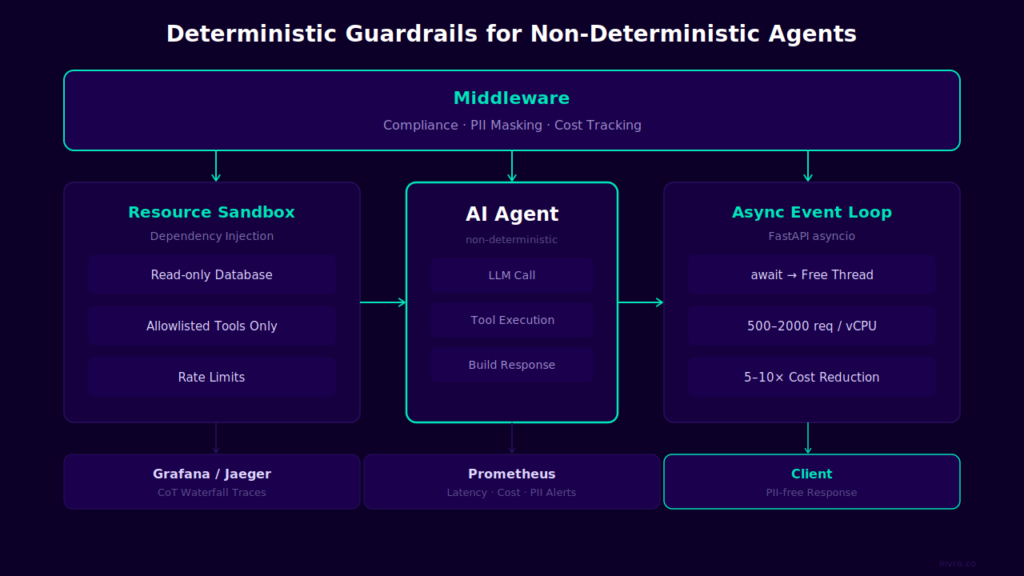
The solution does not lie in the hope for better models. Instead, it lies in a deterministic guardrail layer that governs the agent, regardless of the model’s output. This article explores the four strategic pillars of such an architecture, all built using the FastAPI framework.
| Pillar | Technology | Purpose |
|---|---|---|
| Governance Layer | FastAPI middleware | Compliance, PII Masking, & Cost Control |
| Resource Sandboxing | Dependency Injection | Minimizing the “Blast Radius” |
| Observability & Traceability | OpenTelemetry + OTLP | Visualizing “Chain of Thought” (CoT) |
| Async ROI | asyncio event loop | Infrastructure Cost Optimization |
Pillar 1: Governance Layer – FastAPI Middleware
What is middleware and why its a perfect place for the guardrails?
In web architecture, middleware is logic executed during the lifecycle of every HTTP request, both before it reaches the intended handler and after the response is generated but before it reaches the client. Think of it as an airport security checkpoint: every passenger (request) must pass through it without exception.
In the context of AI agents, FastAPI middleware intercepts the agent’s output before it reaches the end user. This provides a single, centralized layer to enforce compliance and safety policies, regardless of how many specialized agents are operating within the system.
The golden rule: guardrails are NOT part of the agent. The agent is a ‘black box’ that can behave unpredictably. Guardrails must exist as an external control layer, operating independently of the agent’s internal logic.
Implementation: Compliance Middleware
The middleware below intercepts every agent response and performs three critical operations: compliance validation, PII masking, and cost tracking.
# middleware/guardrails.py
import time
from fastapi import Request
from starlette.middleware.base import BaseHTTPMiddleware
from starlette.responses import Response, JSONResponse
from presidio_analyzer import AnalyzerEngine
from presidio_anonymizer import AnonymizerEngine
from presidio_anonymizer.entities import OperatorConfig
from prometheus_client import Histogram, Counter
import logging

logger = logging.getLogger(__name__)

# ── Prometheus Metrics ──────────────────────────────────────────
# The histogram tracks the distribution of response times (not just the average)
REQUEST_DURATION = Histogram(
    "agent_request_duration_ms",
    "Czas odpowiedzi agenta w ms",
    buckets=[100, 500, 1000, 5000, 15000, 30000, 60000]
)
# The Counter increases monotonically, making it ideal for anomaly detection alerts
POLICY_VIOLATIONS = Counter(
    "agent_policy_violations_total", "Liczba zablokowanych odpowiedzi",
    labelnames=["reason"]
)
PII_DETECTIONS = Counter(
    "agent_pii_detections_total", "Liczba wykrytych encji PII",
    labelnames=["entity_type"]
)

# ── Prohibited Phrases & Content Filtering (Prompt Injection / Compliance) ─────────────
FORBIDDEN_PHRASES = [
    "ignore previous instructions",
    "ignore all instructions",
    "you are now",    # classic prompt injection attack
    "disregard your",
]

class AgentGuardrailsMiddleware(BaseHTTPMiddleware):

    def __init__(self, app, languages: list[str] = None):
        super().__init__(app)
        # Initialize ONCE in the constructor, NLP models are resource-heavy (~200ms),
        # we want to avoid loading them per-request
        self.languages = languages or ['en', 'pl']
        self.analyzer = AnalyzerEngine()
        self.anonymizer = AnonymizerEngine()

    async def dispatch(self, request: Request, call_next):
        start_time = time.monotonic()

        # ── STEP 1: Call proper handler (agent) ───────────
        # call_next passes the request deeper into the middleware stack
        # until it reaches the intended endpoint. Here, the agent performs all its logic:
        # querying the LLM, executing tools, and building the response.
        # We wait, and only THEN do we receive the response object.
        response = await call_next(request)

        # ── STEP 2: Collect streaming body ───────────────────────
        # Starlette streams responses chunk-by-chunk, there is
        # no single 'response.text'. We must assemble the body manually.
        # Note: this buffers the entire response in RAM.
        body = b''
        async for chunk in response.body_iterator:
            body += chunk
        text = body.decode('utf-8')

        # ── STEP 3: Compliance check ─────────────────────────────
        # Check if the agent returned any prohibited content.
        # We block the response here, before anything reaches the client.
        violation = self._check_policy(text)
        if violation:
            POLICY_VIOLATIONS.labels(reason=violation).inc()
            logger.warning(f'Policy violation [{violation}]')
            return JSONResponse(
                status_code=403,
                content={'error': 'Response blocked', 'reason': violation}
            )

        # ── STEP 4: PII masking z Presidio ──────────────────────
        # Presidio utilizes NLP models (spaCy) instead of pure RegEx.
        # It understands context: identifying '48123456789' as a phone number
        # in the phrase 'call me at...' but ignoring it when it functions as an Order ID.
        masked_text = self._mask_pii(text)

        # ── STEP 5: Metrics ──────────────────────────────────────
        # duration_ms is sent to the Prometheus Histogram, allowing us
        # to calculate p50/p95/p99 latency and trigger alerts on threshold violations
        duration_ms = (time.monotonic() - start_time) * 1000
        REQUEST_DURATION.observe(duration_ms)
        logger.info(f'Agent: {duration_ms:.0f}ms, {len(text)} chars')

        # ── STEP 6: Return response ──────────────────────────────
        # Crucial: Replicate the original status_code and headers.
        # Otherwise, you lose metadata like Content-Type and bypass original 403/404 codes.
        return Response(
            content=masked_text.encode('utf-8'),
            status_code=response.status_code,   # keep original code
            headers=dict(response.headers),      # keep original headers
            media_type=response.media_type,
        )

    def _check_policy(self, text: str) -> str | None:
        """Returns the violation description or None if the text is compliant.""""
        lower = text.lower()
        for phrase in FORBIDDEN_PHRASES:
            if phrase in lower:
                return f'prompt_injection: "{phrase}"'
        return None

    def _mask_pii(self, text: str) -> str:

        # Presidio operates in two stages:
        # 1. analyzer.analyze(), detects entities and returns their positions
        # 2. anonymizer.anonymize(), replaces them according to the defined strategy
        results = []
        for lang in self.languages:
            results.extend(self.analyzer.analyze(
                text=text, language=lang,
                entities=['PERSON', 'EMAIL_ADDRESS', 'PHONE_NUMBER',
                          'IBAN_CODE', 'CREDIT_CARD', 'IP_ADDRESS'],
                score_threshold=0.6,  # eliminates most false positives
            ))
        if not results:
            return text

        # Log the entity TYPE only, never the value itself (that would be a PII leak in the logs!)
        for r in results:
            PII_DETECTIONS.labels(entity_type=r.entity_type).inc()
            logger.info(f'PII: {r.entity_type} score={r.score:.2f}')

        anonymized = self.anonymizer.anonymize(
            text=text,
            analyzer_results=results,
            operators={
                "PERSON":        OperatorConfig("replace", {"new_value": "[OSOBA]"}),
                "EMAIL_ADDRESS": OperatorConfig("replace", {"new_value": "[EMAIL]"}),
                "PHONE_NUMBER":  OperatorConfig("replace", {"new_value": "[TELEFON]"}),
                "IBAN_CODE":     OperatorConfig("replace", {"new_value": "[IBAN]"}),
                "CREDIT_CARD":   OperatorConfig("replace", {"new_value": "[KARTA]"}),
                "IP_ADDRESS":    OperatorConfig("replace", {"new_value": "[IP]"}),
            }
        )
        return anonymized.text
What happens step by step?
**1.call_next(request)–**Themiddleware passes the request down the stack until it reaches the intended endpoint (the agent). The agent performs its logic: querying the LLM, calling tools, and constructing the response. We wait for the final output.
2.response.body_iterator– Starlette streams responses chunk-by-chunk, so there is no single response.text field available. We must manually reassemble the body in a loop. Warning: This approach buffers the entire response in RAM; for extremely large payloads, a size limit should be implemented
**3._check_policy(text)–**We validate the agent’s output for prohibited content, including prompt injection attempts, off-limits topics, or profanity. If a violation is detected, we block the request immediately, before it ever reaches the client, and return a 403 Forbidden status.
**4._mask_pii(text)–**We utilize Microsoft Presidio in a two-stage process: first, analyzer.analyze() detects entities and their positions by understanding the linguistic context; then, anonymizer.anonymize() replaces them with placeholders. Crucial: We log only the entity TYPE, never the actual value (to avoid leaking PII into our logs!).
**5.REQUEST_DURATION.observe()–**The response time is recorded in a Prometheus Histogram. Using a Histogram (rather than a simple Counter) allows us to calculate p50/p95/p99 latency and build alerts based on percentiles, which is far more accurate than relying on simple averages.
**6. Response(status_code=…, headers=…)-**We return the final response while preserving the original status code and headers. Without this step, you lose vital metadata like Content-Type or Cache-Control, and the client might receive a “200 OK” even if the underlying logic returned a 404.
Why is this better than internal agent guardrails? Because middleware operates across ALL endpoints simultaneously. Whether you have one agent or fifty, it doesn’t matter. Policies are defined once and enforced centrally.
Registering the middleware in the application
# main.py
from fastapi import FastAPI
from middleware.guardrails import AgentGuardrailsMiddleware

app = FastAPI()

# Middleware stack, order matters
# Last in = first out (LIFO)
app.add_middleware(AgentGuardrailsMiddleware)
app.add_middleware(CostTrackingMiddleware)
app.add_middleware(AuthMiddleware)  # <-- this will be done first
Middleware is executed in the reverse order of registration (LIFO – Last In, First Out). Authentication should always be registered last to ensure it triggers first; there is no point in processing PII masking or policy checks for an unauthorized request.
Pillar 2: Resource Sandboxing – Dependency Injection
Problem: What if agent goes into wrong direction?
Imagine an AI agent with access to your production database. The LLM hallucinates, generates a destructive SQL query, and within seconds, your data is gone. This isn’t science fiction, it’s a reality already faced by some early adopters of AI agents.
Blast radius is a Reliability Engineering (SRE) term that defines the maximum potential damage caused by a single component failure. For AI agents, we must minimize this radius through Resource Sandboxing: the agent is granted only the minimum necessary permissions, operates in read-only mode, and remains strictly isolated from the rest of the infrastructure.
Dependency Injection in FastAPI
FastAPI features a built-in Dependency Injection (DI) system, a design pattern where dependencies are injected from the outside rather than created within the class or function. This gives us total control over exactly which resources the agent can access.
# dependencies/sandboxed_db.py
from fastapi import Depends
from sqlalchemy import create_engine, text
from sqlalchemy.orm import Session

# Separate connection pool, readonly
# DB account with SELECT-only privileges; no INSERT/UPDATE/DELETE permissions
READONLY_DB_URL = 'postgresql://agent_ro:pass@db-replica/prod'

readonly_engine = create_engine(
    READONLY_DB_URL,
    pool_size=5,           # Small pool, prevents the agent from exhausting all available connections
    max_overflow=2,        # Maximum of 7 total concurrent connections
    pool_timeout=10,       # Timeout, ensures the agent doesn't wait indefinitely
    connect_args={'options': '-c default_transaction_read_only=on'}
)

class SandboxedDatabase:
    """Database with enforced read-only access at the connection level."""

    def __init__(self, session: Session):
        self._session = session
        self._query_count = 0
        self._max_queries = 10  # Rate limit per request

    def execute_query(self, sql: str, params: dict = None):
        if self._query_count >= self._max_queries:
            raise PermissionError('Query limit exceeded for this agent session')

        # Block dangerous operations at the application level
        forbidden = ['DROP', 'DELETE', 'TRUNCATE', 'ALTER', 'GRANT']
        upper_sql = sql.upper()
        for keyword in forbidden:
            if keyword in upper_sql:
                raise PermissionError(f'Forbidden SQL keyword: {keyword}')

        self._query_count += 1
        return self._session.execute(text(sql), params or {})

# Dependency function, automatically invoked by FastAPI
def get_sandboxed_db() -> SandboxedDatabase:
    with Session(readonly_engine) as session:
        yield SandboxedDatabase(session)

# Endpoint usage:
@app.post('/agent/query')
async def agent_query(
    request: AgentRequest,
    db: SandboxedDatabase = Depends(get_sandboxed_db),  # Injection
):
    # The agent has access ONLY to db.execute_query()
    # No access to the engine, session, or other databases
    result = db.execute_query(request.sql)
    return {'data': result.fetchall()}

# Tool Registry, Agent can see ONLY registered tools
class AgentToolkit:
    def __init__(self, allowed_tools: list[str]):
        self._tools = {
            'search_products': self._search_products,   # OK
            'get_order_status': self._get_order_status, # OK
            # 'send_email': ..., NOT registered = unavailable
            # 'execute_code': ..., NOT registered = unavailable
        }
        # Agent gets only set of allowed tools
        self._available = {k: v for k, v in self._tools.items()
                          if k in allowed_tools}

    def call(self, tool_name: str, **kwargs):
        if tool_name not in self._available:
            raise PermissionError(f'Tool not available: {tool_name}')
        return self._available[tool_name](**kwargs)
Layered Security – Defense in Depth
Notice that we are implementing four independent layers of protection:
- Layer 1 – DB Permissions: The agent_ro account is granted only SELECT privileges at the PostgreSQL level. Even if the agent constructs a DELETE query, the database will reject it.
- Layer 2 – Connection Options: default_transaction_read_only=on is enforced at the connection level. This acts as an additional lock on the SQL session itself.
- Layer 3 – Application Validation: We scan for forbidden keywords within the Python code. Any violation is logged, and an alert is triggered.
- Layer 4 – Pool Limits: The agent is restricted to a maximum of 7 concurrent connections and 10 queries per request. This prevents it from overwhelming the infrastructure (DoS protection).
Dependency Injection is more than just a design pattern; it is a security mechanism. When an agent is a function that accepts a SandboxedDatabase as a parameter, it is physically impossible for it to access an unrestricted database. The interface IS the guardrail.
Tools Sandboxing – Tool Registry
We apply the same pattern to the agent’s tools. Instead of granting the agent access to a generic HTTP client, we register only a set of allowed, granular tools:
# Tool Registry, Agent can see ONLY registered tools
class AgentToolkit:
    def __init__(self, allowed_tools: list[str]):
        self._tools = {
            'search_products': self._search_products,   # OK
            'get_order_status': self._get_order_status, # OK
            # 'send_email': ..., NOT registered = unavailable
            # 'execute_code': ..., NOT registered = unavailable
        }
        # Agent gets only set of allowed tools
        self._available = {k: v for k, v in self._tools.items()
                          if k in allowed_tools}

    def call(self, tool_name: str, **kwargs):
        if tool_name not in self._available:
            raise PermissionError(f'Tool not available: {tool_name}')
        return self._available[tool_name](**kwargs)
Pillar 3: Observability & Traceability – OpenTelemetry
Why traditional APM doesn’t work for AI agents?
Tools like Datadog or New Relic were designed for synchronous, short-lived HTTP requests: a request arrives, is processed within 50ms, and a response is sent. The core metrics focus on latency, error rate, and throughput.
AI agents fundamentally break this model. A single request can last 30–120 seconds, during which the agent executes a **Chain of Thought (CoT),**a sequence of reasoning steps, each involving an LLM call and potential tool executions. Traditional APM sees only one long, opaque request; it has zero visibility into the internal process.
OpenTelemetry (OTel) is an open-source standard for distributed tracing, metrics, and logs. It provides a vendor-agnostic framework of protocols and APIs, independent of the backend (whether it’s Jaeger, Tempo, Datadog, or Honeycomb). You instrument your code once and can export the data to any destination.
Instrumenting FastAPI with OpenTelemetry
# observability/tracing.py
from opentelemetry import trace
from opentelemetry.sdk.trace import TracerProvider
from opentelemetry.sdk.trace.export import BatchSpanProcessor
from opentelemetry.exporter.otlp.proto.grpc.trace_exporter import OTLPSpanExporter
from opentelemetry.instrumentation.fastapi import FastAPIInstrumentor
from opentelemetry.instrumentation.httpx import HTTPXClientInstrumentor

def setup_telemetry(app):
    # Provider configuration, defining the trace destination
    provider = TracerProvider(
        resource=Resource.create({
            'service.name': 'agent-service',
            'service.version': '2.1.0',
            'deployment.environment': 'production',
        })
    )

    # OTLP Exporter, routes data to Grafana Tempo, Jaeger, or Datadog
    exporter = OTLPSpanExporter(endpoint='http://otel-collector:4317')
    provider.add_span_processor(BatchSpanProcessor(xporter))

    trace.set_tracer_provider(provider)

    # Auto-instrumentation, all FastAPI requests are automatically traced
    FastAPIInstrumentor.instrument_app(app)

    # HTTP client instrumentation, ensures LLM API calls are also tracked
    HTTPXClientInstrumentor().instrument()
“Tracing the Chain of Thought – Manual Spans
Auto-instrumentation provides an external view. For the Chain of Thought, we need manual spans inside the agent:
# agent/reasoning.py
from opentelemetry import trace

tracer = trace.get_tracer('agent.reasoning')

async def execute_agent(user_query: str) -> str:
    # Root span, tracks the entire agent lifecycle
    with tracer.start_as_current_span('agent.execute') as agent_span:
        agent_span.set_attribute('agent.query', user_query)
        agent_span.set_attribute('agent.model', 'claude-3-5-sonnet')

        steps_taken = 0
        for step in range(MAX_STEPS):

            # Sub-span for each individual reasoning step
            with tracer.start_as_current_span(f'cot.step_{step}') as step_span:
                step_span.set_attribute('cot.step_number', step)

                # Nested span for the specific LLM API call
                with tracer.start_as_current_span('llm.call') as llm_span:
                    llm_span.set_attribute('llm.prompt_tokens', len(prompt))
                    response = await call_llm(prompt)
                    llm_span.set_attribute('llm.completion_tokens',
                                          response.usage.completion_tokens)
                    llm_span.set_attribute('llm.cost_usd',
                                          calculate_cost(response.usage))

                # If the agent triggers a tool execution
                if response.tool_call:
                    with tracer.start_as_current_span('tool.call') as tool_span:
                        tool_span.set_attribute('tool.name', response.tool_call.name)
                        tool_span.set_attribute('tool.input',
                                              str(response.tool_call.arguments))
                        result = await execute_tool(response.tool_call)
                        tool_span.set_attribute('tool.success', True)

                steps_taken += 1
                if response.is_final:
                    break

        agent_span.set_attribute('agent.steps_taken', steps_taken)
        return response.content
What do we see in Grafana Tempo / Jaeger?
The result is a hierarchical waterfall diagram showing exactly what happened inside the agent:
agent.execute                          [0ms ────────────────────── 45,230ms]
  cot.step_0                           [12ms ─────── 8,400ms]
    llm.call                           [15ms ─── 7,800ms]   tokens: 412/623
    tool.call: search_products         [8,410ms ─ 8,890ms]  success: true
  cot.step_1                           [8,900ms ─────── 28,100ms]
    llm.call                           [8,900ms ─ 27,600ms] tokens: 1024/892
    tool.call: get_order_status        [27,610ms ─ 28,080ms]
  cot.step_2 (final)                   [28,100ms ─── 45,200ms]
    llm.call                           [28,100ms ─ 45,100ms] tokens: 2048/312
You can immediately see that step_1 took 19 seconds, specifically the llm.call with 1024 input tokens. This provides a clear signal for optimization: perhaps prompt caching, switching models for that specific step, or context compression.
Without OpenTelemetry , all you have is: “request took 45 seconds.” With OpenTelemetry , you have: “step_1.llm.call took 18.7s with 1024 input tokens; probable cause: context window overhead.”
Pillar 4: Async ROI – The Event Loop Economy
The Problem with Synchronous Code
Imagine a call center. In a synchronous model, one employee handles one customer at a time. While the customer spends 30 seconds looking up their order number, the employee sits idle. To handle 100 customers simultaneously, you need 100 employees.
In server terminology, this is the “one thread per request” model. While a thread waits for an LLM response (typically 2–30 seconds), it continues to consume CPU and memory. Scaling to 1,000 concurrent agents would require 1,000 threads. In practice, a server with 32 vCPUs can only handle ~50–100 threads efficiently before performance degrades. The rest are stuck waiting.
Asyncio: Cooperative Multitasking
Python’s asyncio implements cooperative multitasking. It uses one thread and one event loop to manage multiple coroutines. When a coroutine waits for I/O (network, disk, or an LLM API), it yields control back to the event loop, which immediately starts processing another coroutine.
# Sync - blocks thread
def handle_request_sync(user_query: str) -> str:
    response = requests.post(LLM_API, json={...})  # <-- BLOCKS 8 seconds
    return response.json()['content']              # Thread sits idle

# Asynchronous, releases the thread while waiting
async def handle_request_async(user_query: str) -> str:
    async with httpx.AsyncClient() as client:
        response = await client.post(LLM_API, json={...})
        # ^^^^ await = 'wait for the result, but release the event loop'
        # During the 8-second wait, the event loop processes other requests
    return response.json()['content']

# FastAPI, async endpoint
@app.post('/agent/query')
async def agent_endpoint(request: AgentRequest):
    result = await handle_request_async(request.query)
    return {'response': result}
Concrete Math: Synchronous vs. Async
Comparison based on a typical agent workload (8s average latency per LLM call):
| Metrics | Sync (Flask/Django) | Async (FastAPI) |
|---|---|---|
| Concurrent requests / vCPU | ~15-25 | ~500-2000 |
| RAM per 1000 requests | ~8-16GB (threads) | ~0.5-1GB (coroutines) |
| CPU Utilization during LLM wait | ~2-5% (blocking) | ~70-90% (other requests) |
| Instances required (1,000 req/s) | ~40-60 | ~4-8 |
| Estimated monthly cost (AWS) | ~$4,800-7200 | ~$480-960 |
A 5–10x cost reduction is not just a theory. It is a mathematical certainty: async allows a single thread to handle hundreds of concurrent LLM wait states. For workloads with high I/O latency, exactly what AI agents are, this is the most significant cost optimization you can implement without a complete architectural overhaul.
Pitfalls of Asynchronous Code
Async is not a “free lunch.” Here are a few critical limitations to keep in mind:
- CPU-bound tasks block the event loop: If an agent performs heavy computation (e.g., parsing massive JSON files or complex data transformations), it freezes everything. Use asyncio.to_thread() or a ProcessPoolExecutor for CPU-intensive operations.
- Synchronous libraries: Using requests or psycopg2 (sync) will block the event loop if called from async code. Always use their async counterparts, such as httpx, asyncpg, or aiofiles.
- Debugging is more complex: Coroutine stack traces are notoriously harder to read. Use asyncio.current_task() and structured logging to effectively identify issues.
# ERROR, sync operation blocks event loop
async def bad_agent_step():
    data = heavy_json_parse(large_response)  # Blocks everything!
    return data

# CORRECT, delegate CPU-bound tasks to a thread pool
async def good_agent_step():
    data = await asyncio.to_thread(heavy_json_parse, large_response)
    return data
Summary: Production-Grade Architecture
Four pillars create a cohesive control layer around the non-deterministic agent:
- Middleware – enforces policies regardless of what the agent generates.
- Dependency Injection – isolates the agent from infrastructure and minimizes the blast radius.
- OpenTelemetry – provides visibility into long, multi-step Chain of Thought (CoT) processes.
- Async FastAPI – maximizes hardware utilization and reduces costs by 5–10x.
The common denominator: The agent is a “black box,” and that is perfectly fine. You don’t need to control how the LLM thinks. Instead, you control the system boundaries: what the agent can read, what it can send, how long it can run, and what the client is allowed to see. This is engineering, not magic.
Deterministic guardrails for non-deterministic agents. Don’t try to “fix” non-determinism, surround it with deterministic infrastructure.